Call waiting allows a device to receive more than one call at a time. Call waiting on Polycom phones connected to your NocTel account can be activated one of two ways depending on the device type.
Phones with 3+ line keys/speed dial instances (VVX3xx, VVX4xx, IP450)
- Log in to a NocTel account.
- Click Extensionsin the left-hand main menu.

- Click on the desired extensions in the list.
- Click > in the Preferences for Polycom Phones widget to expand it.

If you do not see the Preference for Polycom Phones widget, click the gear icon in the upper-right to unhide the management options. - Adjust the first drop-down box in the Line Keyssection to 2 for this extension. You can choose more than 2 line keys if your device supports them.
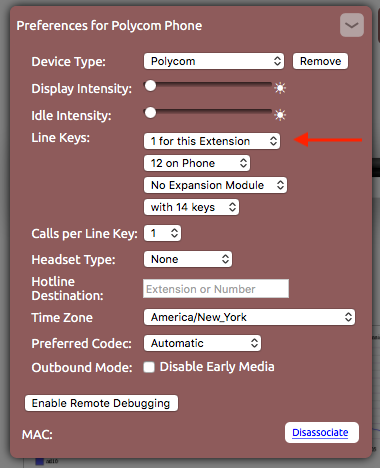
- Click outside the widget to save the changes.
Phones with only 2 line keys/speed dial instance (VVX2xx, IP335)
- Log in to a NocTel account.
- Click Extensionsin the left-hand main menu.
- Click on the desired extensions in the list.
- Click > in the Preferences for Polycom Phones widget to expand it.
If you do not see the Preference for Polycom Phones widget, click the gear icon in the upper-right to unhide the management options. - Adjust the Calls per Line Keyto 2 using the drop-down list.
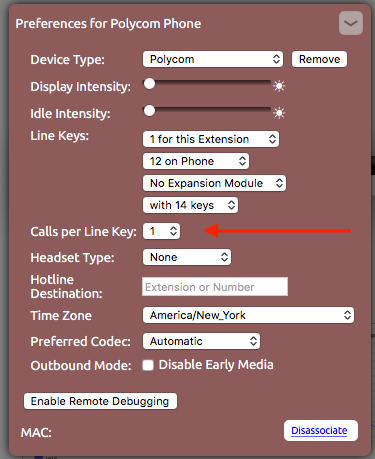
- Click outside the widget to save the changes.
Related articles