In order to use features of the NocTel hosted phone service, you must first log into the NocTel Control Panel at noctel.com. There are two types of accounts: User Accounts and Business Accounts. You will need a User Account before you can join or create a Business Account. If you don't have one, a new one can be created by following these steps.
In order to join or create a Business Account, you must first create a User Account.
Step-by-step guide
Creating a User Account:
- Visit noctel.com

- Click the Login button located in the upper right corner of the page

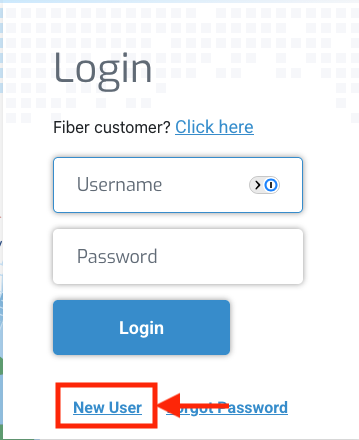
- Click the New User link below the log in fields.
- Enter the requested user data into the form:
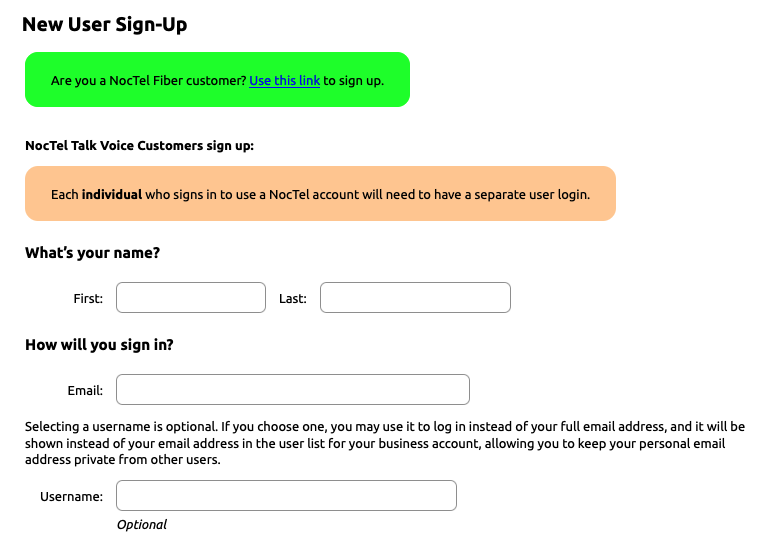
Usernname
Selecting a username is optional. If you do not enter a username, your email address will be your username when logging in. If you choose one, you may use it to log in instead of your full email address, and it will be shown instead of your email address in the user list for your business account, allowing you to keep your personal email address private from other users.
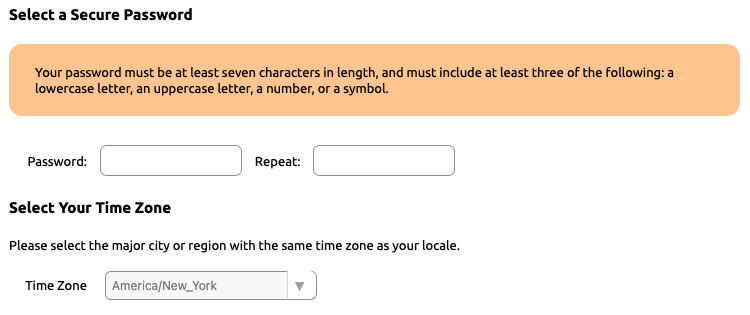
- Select a Password and a time zone.
- Check the Terms of Service box confirming that you have read and accepted the terms and conditions for your account.

- Click the "Create User" button.

- Check your email for a verification link. Upon receiving this, click the link to finish creation of your account.
You can create your own business account. Start by selecting the "Plan" that you wish to use. Click here for our guide on creating a business account.
Related articles